
Tech
How to choose a robot vacuum in 2025: Dont buy one before considering these features


Roborock Saros 10R

3i G10+

Eufy E20 3-in-1

Making the call to buy a robot vacuum instead of a stick vacuum now isn't the risk that it was half a decade ago. Not when you have a grasp on the robot vacuum features to look for.
Back then, lazy suction power and even lazier attempts to return to the dock had many robot vacuum lemons collecting dust while their embittered owners reverted to vacuuming by hand. But in 2025, the best robot vacuum brands like iRobot, Roborock, Shark, and Eufy have robust lineups of robot vacuums that actually make life easier — not harder. And as more and more robot vacuums adapt to the changing expectations from consumers, features that were once considered premium are much easier to afford nowadays.
Despite the less intimidating cost spectrum, it's still possible to underpay or overpay for a robot vacuum. The question isn't whether or not a robot vacuum is worth it in your home at all — it's about which features are worth it in your home. So many brands offering affordable premium features can make it hard to know how to choose a robot vacuum that'll best suit you. I can yap about all of my learned tips on how to make your robot vacuum work better once you already have it. But for those still in the shopping phase, here's a straightforward buyer's guide on the most important factors to consider before buying a robot vacuum.
Do I need a self-emptying robot vacuum?

Credit: Leah Stodart / Mashable

Credit: Leah Stodart / Mashable
Self-emptying robot vacuums are definitely worth the convenience, regardless of how big your space is. If you're already trying to absolve yourself of vacuuming responsibilities, chances are that you also won't feel like dealing with the dust bin multiple times per week.
When cleaning is automated, your floors are probably going to be swept more often, anyway, filling up a robot vacuum's onboard dustbin faster. Larger homes and homes with pets will expedite dustbin fullness as well. A self-emptying robot vacuum will come in clutch here, which automatically empties its debris into the same dock it charges on. This leaves you off the hook from any dustbin maintenance for at least a month or two.
Automatic emptying docks do require more floor space than the toaster-sized docks of standalone models. But there are many compact self-emptying robot vacuums that would fit in a small space.
What is a smart mapping robot vacuum?


If there's one robot feature that you don't skip, make it this. Smart mapping is a type of navigational tech that enables a robot vacuum to scope out and remember a copy of your home's floor plan. The map drawn during the vacuum's initial mapping run will pop up in the corresponding smartphone app, where you tweak it by dragging and dropping borders, merging or splitting rooms, and adding labels. Then, the robot vacuum can clean specific rooms that need attention that day, or complete a whole-home clean.
Robot vacuums with smart mapping are usually far more agile when it comes to maneuvering around furniture. The bump-and-go approach that most early robot vacuums rely on just can't perceive a jungle of chair legs until it's too late. I'll die on the hill that smart mapping is the baseline brain power that any robot vacuum worth your money should have. If you think about it, actual cleaning skills don't even come into play if a robot vacuum can't successfully get itself to the spots that need to be cleaned.
Luckily, smart mapping isn't an expensive ask nowadays. A budget cap of $200 is more than enough to secure room-to-room mapping from reliable brands like Shark or Roborock.
Spot cleaning and virtual no-go zone

Credit: Eufy
Most robot vacuums that can remember the different rooms in your home can also adhere to app-drawn barriers around smaller zones within those rooms, like around a pile of Lego bricks or your pet's water bowl. This capability is crucial if you purchase a robot vacuum that does mop but doesn't recognize the difference between tile and a bath mat (more on this in the mopping section below).
Small obstacle avoidance
This navigational prowess would mean you shouldn't have to set keep-out zones in the app at all. Robot vacuums with small obstacle avoidance can detect and avoid problem-causers like cords, laundry, and even pet waste — things that are bound to show up on the floor on one day or another. The freedom that comes with skipping the pre-tidying routine is far too convenient.

Credit: Leah Stodart / Mashable
While the cameras used to perceive obstacles in front of them aren't exactly the kind that take pictures, some fancier robot vacuums legitimately have livestream cameras. These give you a floor-level view of whatever the vacuum sees as it's roving your home, making it a pretty comforting tool for pet parents when they're away. Some cameras are even accompanied by two-way microphones to talk to your pets or call another person who's at home.
What robot vacuum works best on hardwood floors?
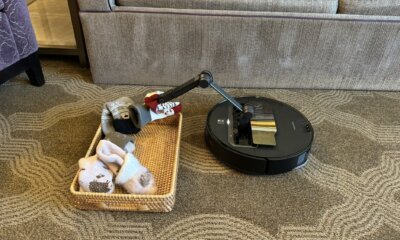
Robot vacuums have a much easier time sweeping free-floating debris off hardwood or tile than carpet. However, crumbs and hair don't have anything to grab onto on hard floors like they do on carpet, so debris often gets blown into corners. If you're picky about the cleanliness of the outskirts of the room like I am, look for a robot vacuum with a dedicated extendable edge sweeping brush. These go further than the lousy side brush affixed to cheap robot vacuums — they actually reach out a few inches past the robot vacuum's circular shape to push debris out of 90-degree angles and edges, like along the kitchen counter. Roborock's FlexiArm, seen on the Saros 10 and Saros 10R vacuums, is my favorite example.
Can robot vacuums go from hardwood to carpet?
Yes, just about any modern robot vacuum can switch between floor types without a hiccup. However, if your home has a heavy rug situation (including those pesky fluffy bath rugs), look for a robot vacuum with large wheels that can hoist it over various thresholds and carpet piles.

Credit: Leah Stodart / Mashable
If your home has a pretty even mix of hard floors and carpet or rugs, floor type sensors will make your life easier. With these, a botvac can tell the difference between hard floors and soft ones, adjusting its suction method (and sometimes even how high it's hovering over the floor) accordingly. This looks like suction that's automatically boosted when the robot vacuum encounters carpet or, lifting mopping pads when the vac approaches a rug.
Do I need a robot vacuum that mops?
It's definitely worth getting a robot vacuum and mop combo if your home has a lot of hard flooring. If you don't feel like doing your own vacuuming, you're probably even more severely depleted of the motivation to do your own mopping.
Mopping intensity varies greatly from vacuum to vacuum. While nearly any 2-in-1 model can probably reliably wipe up a fresh juice spill with its wet cloth, a mopping mechanism like sonic mopping (which vibrates) or dual pressurized mopping pads (which spin) exert the elbow grease needed to penetrate dried stains or shoe prints. Many flagship hybrid models released in 2023 or later can also mop with a cleaning solution rather than just plain water — if you're big on true barefoot-ready sanitation. You could even shop for a soap based on your floor type, like hardwood cleaning solution or pet-safe ingredients.

Credit: Leah Stodart / Mashable
Self-cleaning mopping pads
When deciding on a robot vacuums that mop, you have two options: models that can go from vacuuming to mopping by themselves, or models that need you to be home to physically make the switch to mopping mode. Cheaper 2-in-1 robot vacuums require a person to attach a water tank or mopping pad to switch to mopping mode, while more advanced models permanently have their mopping gear onboard and are ready to start mopping whenever called upon.
The first approach is typically more affordable, but your robot vacuum won't be able to complete a full vacuum and mop session if you're not home to ditch the water tank. These docks also tend to get smelly if not tended to regularly enough, along with mildewy mopping pads if you don't toss them in the laundry often enough. This level of manual involvement is more annoying than it's worth to some people — a lot of folks on Reddit ask for vacuum-only robot vacuum recommendations to avoid dealing with it altogether.
You can get out of this by opting for a robot vacuum and mop that can wash and dry its own mopping pads. Their self-empty dock also houses two water tanks — one for rinsing and refilling clean water, and one to hold the dirty water — plus fans beneath the vacuum for drying. If you're worried about bacteria or mildew, look for a self-cleaning dock that dries with hot hair.

Credit: Leah Stodart / Mashable

Credit: Leah Stodart / Mashable
The ideal robot vacuum and mop combo for pet hair will have this feature to mitigate the amount of fur that builds up on a mopping pad.
Automated mop washing isn't what it was during its initial breakout in 2024. Now, you have plenty of opportunities to score a self-washing and -drying hybrid model for as low as $500, especially during a sale event.
What robot vacuums work well on carpet?
Vacuuming gets trickier on carpet, where debris clings to carpet like velcro after being stepped on all the time.
I'll get into suction power in a second, but the brushroll system can make or break a robot vacuum's carpet performance just as much as the power under the hood. The best robot vacuums for carpet wield dual spinning brushrolls. On some robot vacs, these brushrolls sit parallel and spin toward each other to pinch debris and yank it from the carpet fibers. If your one non-negotiable is a robot vacuum that works on pet hair, you might consider a setup where the brushrolls are arranged beside each other — it'll kind of look like one big brushroll, but with a break in the middle. That opening shoot prevents hair wrapping by pulling hair up into the dust bin instead of pooling it at the sides of the roll.

Credit: Leah Stodart / Mashable
What is good suction power for a robot vacuum?
Most robot vacuum brands measure suction power in pascals (Pa). As of August 2025, the strongest robot vacuum you can buy hits 22,000 Pa, though a new Dreame robot vacuum is set to clock 30,000 Pa when it comes out in the fall. Such intense cyclonic oomph isn't necessary in all homes, though I would generally advise against settling for anything less than 5,500 Pa.
What is a good robot vacuum battery life?
A 90- to 100-minute battery life is sufficient for a robot vacuum to cover an apartment on one charge. This is also fine if most of your cleaning will be done on a room-by-room basis. Battery life of more than 150 minutes isn't hard to find and is ideal for square footage surpassing 2,000.
When battery is low, the robot vacuum will head back to its dock to juice up. Even the cheapest robot vacuums nowadays are self-charging and should automatically resume cleaning afterwards — meaning you won't have to pick them up and escort them back to the base.


Today's NYT Strands hints are easy if you're rowdy.
Strands, the New York Times' elevated word-search game, requires the player to perform a twist on the classic word search. Words can be made from linked letters — up, down, left, right, or diagonal, but words can also change direction, resulting in quirky shapes and patterns. Every single letter in the grid will be part of an answer. There's always a theme linking every solution, along with the "spangram," a special, word or phrase that sums up that day's theme, and spans the entire grid horizontally or vertically.
By providing an opaque hint and not providing the word list, Strands creates a brain-teasing game that takes a little longer to play than its other games, like Wordle and Connections.
If you're feeling stuck or just don't have 10 or more minutes to figure out today's puzzle, we've got all the NYT Strands hints for today's puzzle you need to progress at your preferred pace.
NYT Strands hint for today’s theme: Hullabaloo
The words are related to sound.
Today’s NYT Strands theme plainly explained
These words describe ruckus.
NYT Strands spangram hint: Is it vertical or horizontal?
Today's NYT Strands spangram is horizontal.
NYT Strands spangram answer today
Today's spangram is Lets Get Loud.
Mashable 101 Fan Fave: Nominate your favorite creators today
NYT Strands word list for April 24
-
Shout
-
Holler
-
Clamor
-
Lets Get Loud
-
Bellow
-
Whoop
-
Caterwaul
Looking for other daily online games? Mashable's Games page has more hints, and if you're looking for more puzzles, Mashable's got games now!
Check out our games hub for Mahjong, Sudoku, free crossword, and more.
Not the day you're after? Here's the solution to yesterday's Strands.

Today's Wordle answer should be easy to solve if you love a good drink.
If you just want to be told today's word, you can jump to the bottom of this article for today's Wordle solution revealed. But if you'd rather solve it yourself, keep reading for some clues, tips, and strategies to assist you.
Where did Wordle come from?
Originally created by engineer Josh Wardle as a gift for his partner, Wordle rapidly spread to become an international phenomenon, with thousands of people around the globe playing every day. Alternate Wordle versions created by fans also sprang up, including battle royale Squabble, music identification game Heardle, and variations like Dordle and Quordle that make you guess multiple words at once.
Wordle eventually became so popular that it was purchased by the New York Times, and TikTok creators even livestream themselves playing.
What's the best Wordle starting word?
The best Wordle starting word is the one that speaks to you. But if you prefer to be strategic in your approach, we have a few ideas to help you pick a word that might help you find the solution faster. One tip is to select a word that includes at least two different vowels, plus some common consonants like S, T, R, or N.
What happened to the Wordle archive?
The entire archive of past Wordle puzzles was originally available for anyone to enjoy whenever they felt like it, but it was later taken down, with the website's creator stating it was done at the request of the New York Times. However, the New York Times then rolled out its own Wordle Archive, available only to NYT Games subscribers.
Is Wordle getting harder?
It might feel like Wordle is getting harder, but it actually isn't any more difficult than when it first began. You can turn on Wordle's Hard Mode if you're after more of a challenge, though.
Here's a subtle hint for today's Wordle answer:
Intoxicated.
Does today's Wordle answer have a double letter?
There are no recurring letters.
Mashable 101 Fan Fave: Nominate your favorite creators today
Today's Wordle is a 5-letter word that starts with…
Today's Wordle starts with the letter D.
The Wordle answer today is…
Get your last guesses in now, because it's your final chance to solve today's Wordle before we reveal the solution.
Drumroll please!
The solution to today's Wordle is…
DRUNK
Don't feel down if you didn't manage to guess it this time. There will be a new Wordle for you to stretch your brain with tomorrow, and we'll be back again to guide you with more helpful hints. Are you also playing NYT Strands? See hints and answers for today's Strands.
Reporting by Chance Townsend, Caitlin Welsh, Sam Haysom, Amanda Yeo, Shannon Connellan, Cecily Mauran, Mike Pearl, and Adam Rosenberg contributed to this article.
If you're looking for more puzzles, Mashable's got games now! Check out our games hub for Mahjong, Sudoku, free crossword, and more.
Not the day you're after? Here's the solution to yesterday's Wordle.

The Federal Communications Commission is using the presence of "controversial gender identity issues" in children's television programming as a pretense for questioning how TV ratings are developed and enforced, according to a notice published Wednesday by the federal agency.
The notice generally assesses TV ratings, but specifically points out that these industry guidelines have rated shows featuring "transgender and gender non-binary programming" as appropriate for children. It argues that parents aren't provided this information, "thereby undermining the ability of parents to make informed choices for their families."
In the document, the FCC poses a series of open-ended questions about TV ratings development, including whether the board responsible for the guidelines is "sufficiently balanced" with viewpoints outside of the entertainment industry and if faith-based organizations should be represented in the body.
"What more could the board do to include family-oriented perspectives — which are not well represented in the media industry — in its ratings process?" the notice asks.
FCC Chairman Brendan Carr announced the public notice on X, explaining that "parents have raised concerns with the industry's approach." He added that these parents believe "New York & Hollywood programmers" promote objectionable content in kids programming without disclosing that to parents. Carr didn't mention gender identity in his X post.
This Tweet is currently unavailable. It might be loading or has been removed.
TV parents guidelines can include both a rating as well as descriptors for content that includes crude language, sexual situations, and violence.
LGBTQ+ advocates criticized the public notice, arguing that it amounted to discrimination and censorship.
"Trump's FCC is trying to turn transgender people into a warning label," Tyler Hack, executive director of the transgender rights advocacy group Christopher Street Project, said in a statement. "It is dehumanizing, and it is part of a broader political strategy to stigmatize LGBTQ+ people in every corner of public life."
Sarah Kate Ellis, president and CEO of GLAAD, described the notice as government overreach.
"Media companies must be allowed to create and broadcast stories that reflect one-quarter of their audience without interference from a government agency with its own anti-transgender political agenda," Ellis said in a statement.
This isn't the first time Carr has been accused of censorship. Carr has claimed broadcasters air "hoaxes" and "news distortions" that also happen to be unfavorable to President Trump. Carr has suggested the licenses of such broadcasters won't be renewed.
In March, dozens of free speech experts argued in an open letter to Carr that his threats against broadcasters are "unlawful jawboning" and his vague characterization of "fake news" violates the First Amendment. The authors called on Carr to "withdraw" his threats.

Which New Music Release Is Your Favorite This Week? Vote!
Celeb-Loved Juicy Couture T-Shirts Are On Sale for $8 Right Now (If You Hurry)
Head Back to Hawkins With New ‘Stranger Things: Tales From ’85’ Soundtrack

SEND IN THE TROOPS! At Least 5 Dead, 10 Wounded So Far in Chicago Weekend Shootings
How I Paid Off My Mortgage 10 Years Early On A Teacher’s Salary

Black Lives Matter Activist in Boston Pleads Guilty to Federal Fraud Charges – Scammed Donors to Fund Her Lifestyle
-
 Politics1 year ago
SEND IN THE TROOPS! At Least 5 Dead, 10 Wounded So Far in Chicago Weekend Shootings
-
Business1 year ago
How I Paid Off My Mortgage 10 Years Early On A Teacher’s Salary
-
 Politics1 year ago
Black Lives Matter Activist in Boston Pleads Guilty to Federal Fraud Charges – Scammed Donors to Fund Her Lifestyle
-

 Tech1 year ago
Get a lifetime subscription to the “ChatGPT for investors” for under $60
-

 Tech1 year ago
Review: The Dreame H15 Pro CarpetFlex is the first wet/dry vacuum I liked
-
Business1 year ago
25 Low-Effort Side Hustles You Can Start This Weekend
-
 Tech1 year ago
How much does the Roborock Saros Z70 cost? And does it ever go on sale?
-
Business1 year ago
9 Ways to Command a Six-Figure Salary Without a Bachelor’s