
Tech
The best (and most discreet) sexting apps for confidential chats


The best sexting apps open up a whole new frontier for your sex life. You may think of sex as more of an IRL activity, and rightfully so, but sexting is an exciting new form of digital foreplay. It lets you build anticipation to a fever pitch. It's also a fun way to explore your kinks, role-play, and connect with your partner on a deeper level, especially when you’re not physically together.
Sexting (aka talking dirty, swapping nudes, leaving steamy audio notes, etc.) is a portmanteau of "sex" and "text," and it requires a little more thought than opening up a new text message on your phone. You've also got your and your partner's privacy to consider. Likewise, you can't just open a random dating app, slide into someone's DMs, and start a spicy conversation. You might be able to do that on sites like AdultFriendFinder or Grindr, but it could actually be a huge red flag elsewhere.
So, how do you find a sexting partner, and what are the best apps for sexting in 2025?
We tested dozens of platforms, consulted security experts, and spent a lot of time reading terms of service and privacy policies to answer that exact question.
How we picked the best sexting apps
Privacy and security should always be your highest priority. That's why we always put user safety at the top of our list when trying out new sexting apps. (Speaking of privacy, establishing consent before sexting is a must.)
"If an app is being used to share intimate content, privacy features cannot be optional — they’re essential," says Gary Orenstein, Chief Customer Officer at Bitwarden (an open-source password manager). What tops his list? "First and foremost, end-to-end encryption is critical," so only you and your partner see the messages, not even the app company itself.
Orenstein also recommends looking for apps with "built-in controls, such as disappearing messages and self-destructing media [which] help minimize long-term exposure of shared materials" and features like "screenshot detection or alerts [that] can discourage unauthorized saving," though these aren't always foolproof.
Whether you’re in a committed relationship, single and swiping on hookup apps, looking for a regular sexting buddy, or amping up a solo sesh with steamy instructions from an AI companion, we recommend downloading an app for safe sexting. After all, if you believe in safe sex, you should practice safe sexting, too.
Based on hands-on testing, expert opinions, and user reviews, we picked the best sexting apps for you to try in 2025.
Recent updates to this guide:
We regularly test new apps and dating platforms. For our most recent update to this guide on Sept. 27, 2025, we made the following changes:
-
Lovesense Remote: We added Lovesense Remote as the app that's "Best for Group Sexting." Lovesense Remote is also a fun way for couples (and polyamorous folks) to incorporate sexting and Bluetooth sex toys to their love life.
-
FetLife: We named FetLife "Best for Niche Kinks & Fetishes." This social networking platform is popular in the kinkster community and can be a good way to connect with sexy new friends.
-
Confide: We've once again named this the best overall sexting app, replacing Signal as the top pick. We still recommend Signal as the best free secure messaging app. On balance, we think Confide's security and privacy tools give it the edge.

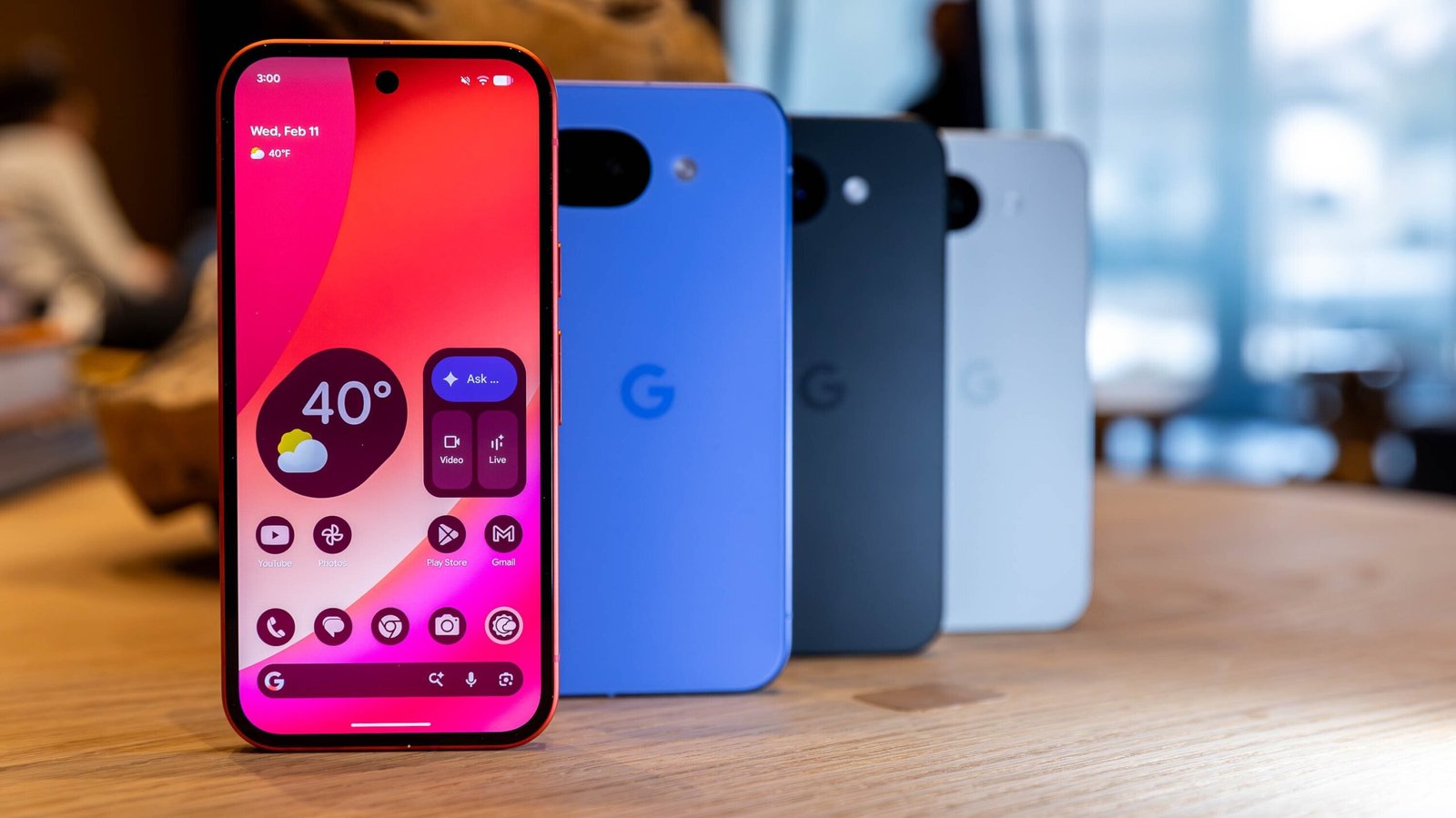
Google's new Pixel 10a lacks novelty, but for a budget phone, that's not such a bad thing.
The Android maker's $500 handset walks the same road that its predecessors have for several years now: It's a slightly downgraded version of last year's Pixel 10.
So, what's new this time around? Besides the lower price and slightly downgraded specs, the camera array is now completely flush with the rest of the phone, eliminating the camera bump entirely (take notes, Samsung and Apple). The end result is a phone that's a lot like the more expensive Pixel 10 and still $100 less than the new budget iPhone 17e Apple just announced.
The Pixel 10a may not be a conversation starter, but not every phone needs to be one, and it's a good smartphone nonetheless.
At launch, you can buy the Google Pixel 10a at Amazon and choose from either a free $100 gift card or a free pair of the Pixel Buds 2a.

Opens in a new window
Google Pixel 10a: Specs
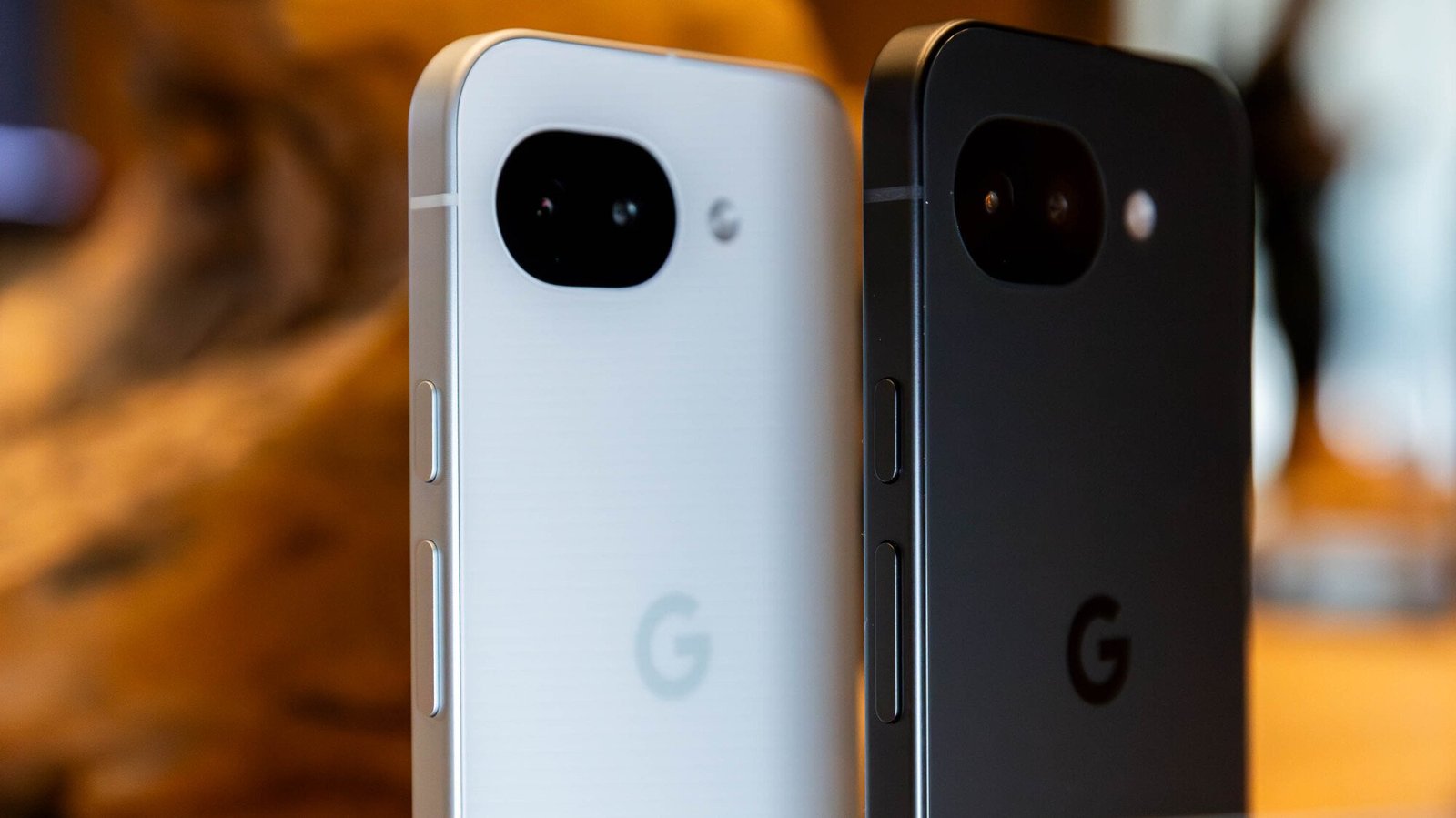
Credit: Joe Maldonado / Mashable
Without wasting too much time, here's what you can expect specs-wise from the Pixel 10a:
-
6.3-inch display with 1080×2424 resolution and 60-120Hz adaptive refresh rate
-
Up to 3,000 nits peak brightness
-
Google Tensor G4 processor
-
5,100mAh battery
-
8GB RAM
-
128/256GB storage
The two most important points of comparison here are going to be the Pixel 9a and Pixel 10. Let's start with the former. The display size and specs are nearly identical, though the new Pixel 10a sports 3,000 nits of peak brightness, making it the brightest A-series Pixel phone to date. Google kept the processor and battery size the same, and didn't mess with RAM or storage, either. You're not getting less with Pixel 10a than you got with Pixel 9a, but you're not really getting much more, either.
Perhaps more crucially, the Pixel 10a is very similar specs-wise to the Pixel 10, a phone that starts at $800. The display is basically identical, the storage options are too, and the battery cell is actually slightly bigger in Pixel 10a than Pixel 10.
The main things Google cut to get the price down to $500 are the RAM (Pixel 10 has 12GB) and the processor. Pixel 10a uses the comparatively old Tensor G4 chip rather than the Tensor G5 introduced with the Pixel 10 lineup last year. This is a little strange and a departure from how Google usually handles the A-series phones, but it doesn't actually affect practical, daily use much.
Finally, there's also one notable camera downgrade from Pixel 10 to 10a, but we'll get to that later.
Google Pixel 10a: Design
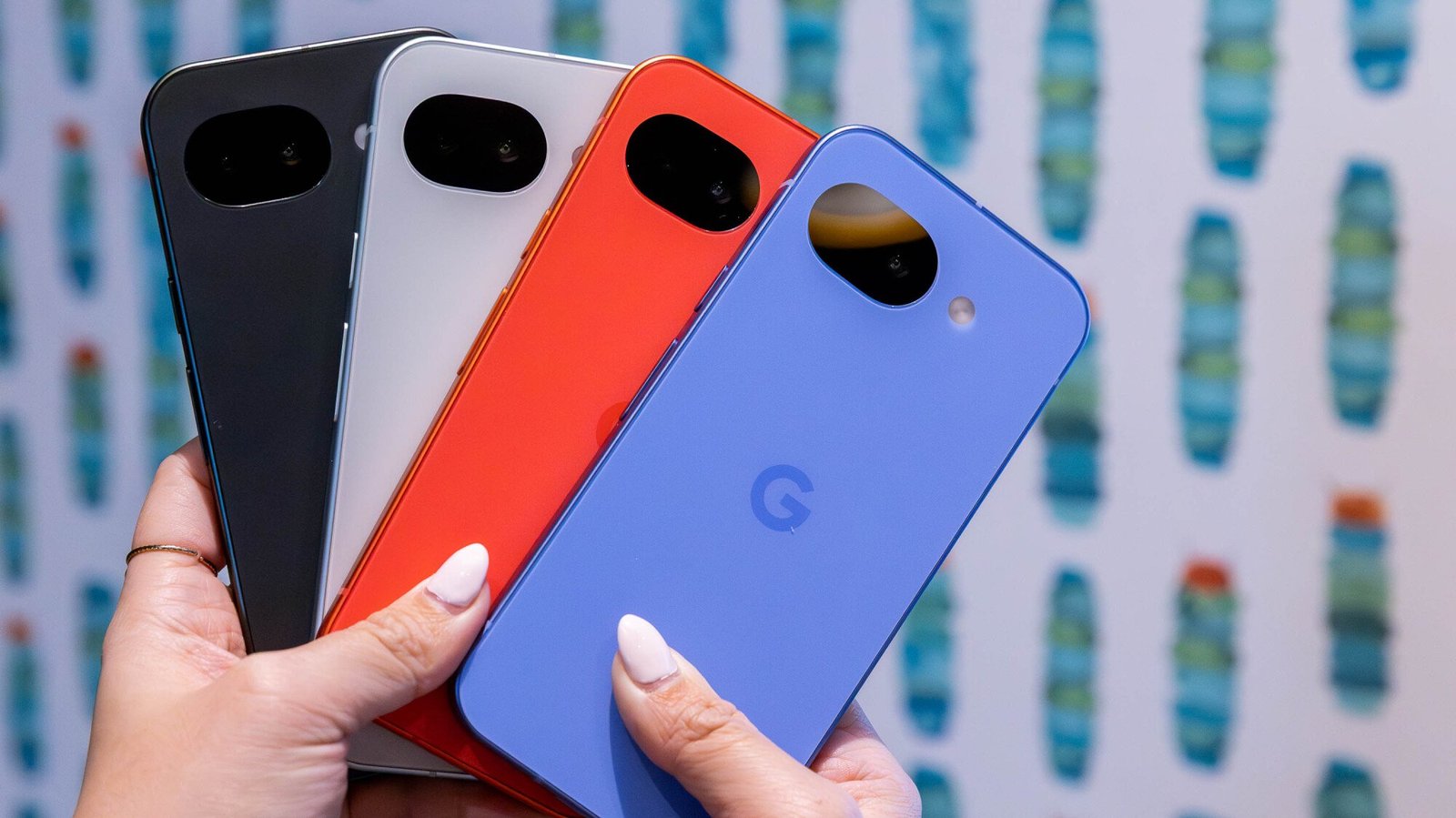
Credit: Joe Maldonado / Mashable
Pixel 10a comes in four colors: Lavender, Berry, Fog, and Obsidian. Our review unit is the Lavender model, and I think it looks lovely. That said, for once, the colors aren't the most interesting part of the redesign.
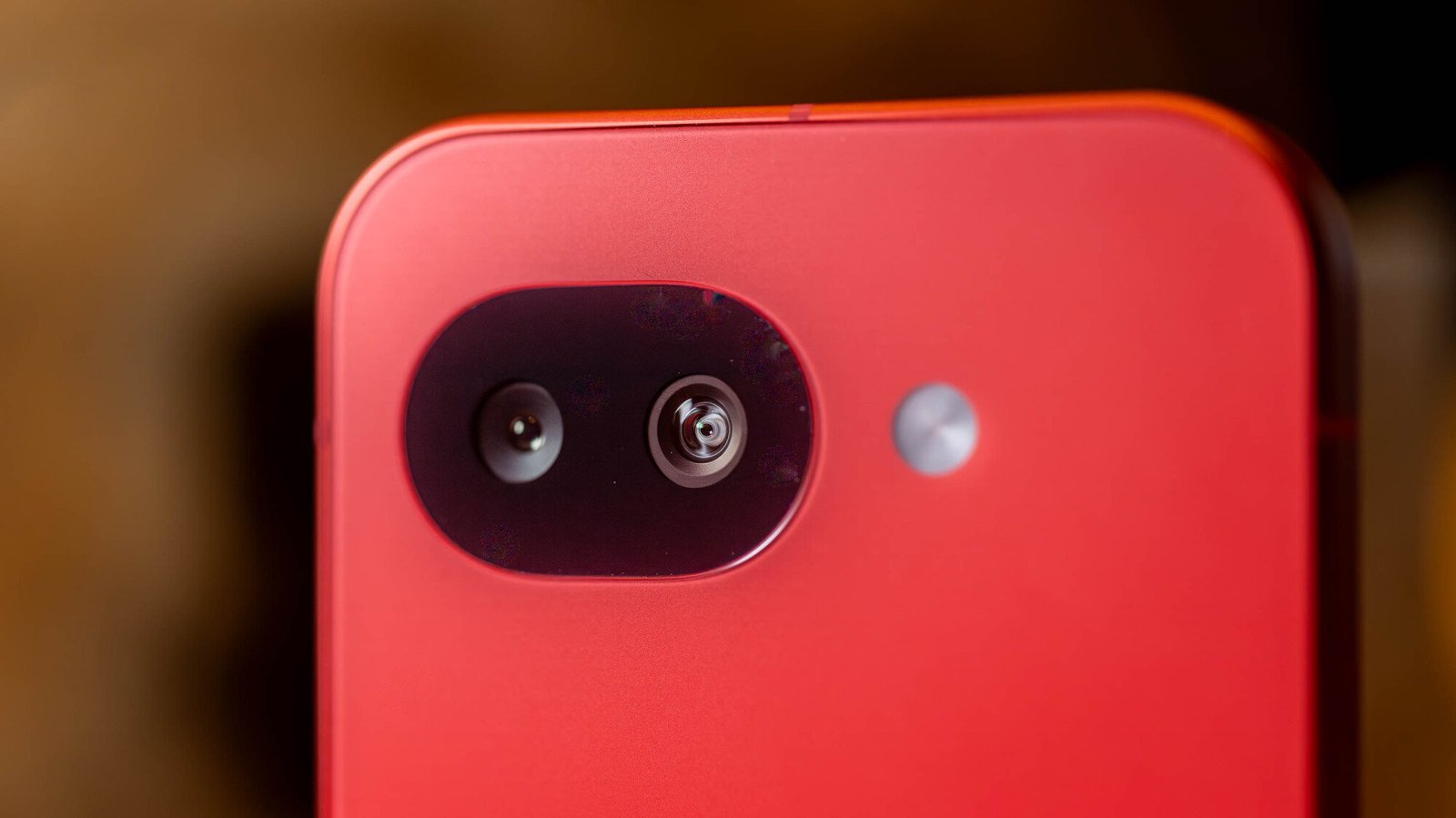
Last year, with the Pixel 9a, Google removed the iconic horizontal camera bar that adorns regular Pixel phones, in favor of something much less visible and intrusive. Pixel 10a maintains the same basic look, but the camera has been sanded down even more, so it's completely flush with the backside of the device.
Yes, unlike most other modern smartphones, you can lay the Pixel 10a down on its back on a flat surface and there will be no wobble whatsoever. Your expensive Samsung Galaxy or iPhone 17 could never.
It's not a huge change, but it's welcome, nonetheless. I was at first opposed to making Pixel A-series phones look different, but thanks to this alteration, I think I now prefer the way they look over the big boy phones.
For what it's worth, Google also slimmed down the bezels, which is always nice. The new phone also uses Corning Gorilla Glass 7i, as opposed to Gorilla Glass 3 on Pixel 9a. It should be more durable now, but frankly, I'm not going to do a bunch of violent drop tests with a review unit phone to find out. That's what JerryRigEverything is for.
Google Pixel 10a: Software

Credit: Joe Maldonado / Mashable
This is really the only somewhat sketchy part of the Pixel 10a. Remember earlier when I mentioned that Google didn't bring forward the Tensor 5 chipset from last year? It turns out this decision had some consequences in terms of which flashy AI features are and aren't available on Pixel 10a.
Put simply, this phone does not have complete AI parity with the Pixel 10. Perhaps the biggest missing feature is Magic Cue, a context-dependent assistant that brings up relevant information based on what's happening on your screen. On Pixel 10, if someone texted you to ask about an event in your calendar, Magic Cue would automatically surface the calendar entry for your convenience. That will not happen on Pixel 10a, because Magic Cue just isn't available here.
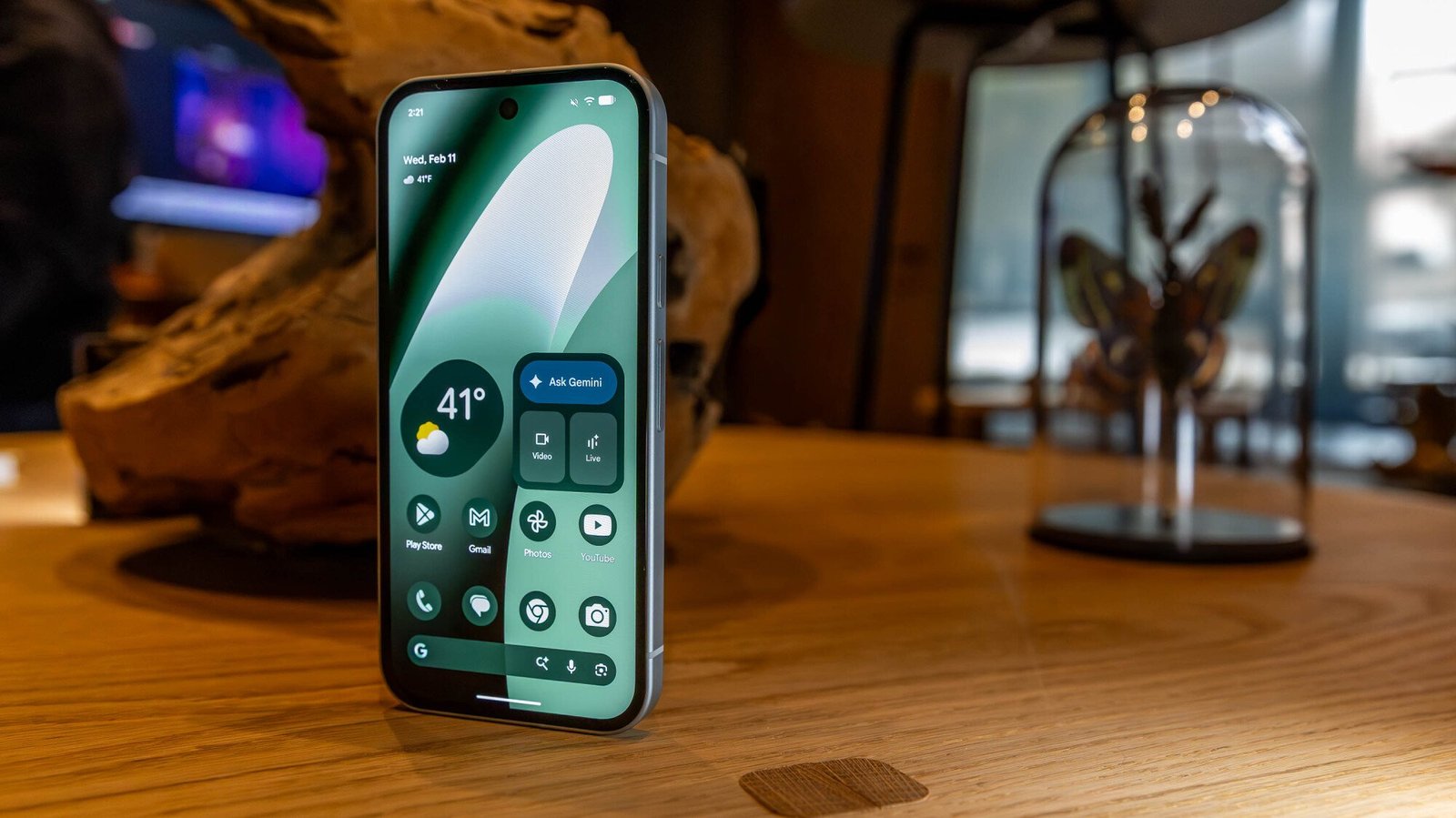
Credit: Google
The same goes for Daily Hub, a Pixel 10 feature that would act as a, well, hub for news, sports information, and YouTube videos based on your personal interests. To be fair, though, this may not be a chipset problem; Google removed Daily Hub from Pixel 10 to iron out some kinks, and as of January, it's still not back. Automatic voice translation in phone calls is also missing, which is unfortunate because that was probably the best AI feature of the bunch last year.
While the Pixel 10a can't fully replicate the Pixel 10's AI portfolio, it does bring forward Camera Coach, an AI feature from the Pixel 10 that uses AI to assist amateur photographers in finding the best shot composition for whatever photo they're taking. That's kind of it, though. The other noteworthy AI features, like Best Take (which can combine several shots to produce a perfect take), Circle to Search, and Gemini support, were already present in the Pixel 9a and don't seem to work any differently here.
Google Pixel 10a: Performance and battery life

Credit: Joe Maldonado / Mashable
For as much as it kinda stinks that Google maintained the older Tensor G4 chip from a software availability perspective, it doesn't affect day-to-day performance that much. Apps load quickly, everything works smoothly, and generally speaking, I can't think of anything performance-wise that went horribly wrong in my time with the Pixel 10a. I can't provide Geekbench benchmarking metrics because that app isn't compatible with the Pixel 10a at the time of writing, but trust me, the phone works fine.
Bringing along the newer Tensor G5 processor might have potentially helped with battery life, though. The battery life on Pixel 10a isn't bad by any means, but it isn't noticeably better than Pixel 9a, either. The cell size is the same, and Google still rates it for about 30 hours of usage, which you can easily get as long as you don't do too much YouTubing or other battery-intensive activities. My charges lasted closer to 24 hours, which is acceptable for a $500 phone but not remarkable.
The good news is that Pixel 10a now supports 30W fast wired charging and 10W wireless charging, so if you have compatible adapters or chargers, you won't need to wait too long for the Pixel 10a to fill up on juice. I wish Google had improved the battery more, but giving users more charging options is nice, at any rate.
Google Pixel 10a: Cameras
Credit: Google
Aside from Camera Coach, Google doesn't seem to have added any fun new photography features to Pixel 10a. The camera specs themselves are also identical to Pixel 9a:
-
48MP wide
-
13MP ultra-wide
-
13MP selfie
One major thing that's missing from the Pixel 10a is a third telephoto lens. That was one of the biggest and best additions to the Pixel 10 family last year, and it's not included here, presumably to keep costs down. Still, the digital zoom does a decent enough job by itself.

Credit: Alex Perry/Mashable

Credit: Alex Perry/Mashable
While the camera setup here isn't any better than Pixel 9a, it's also not any worse. Colors pop and images look sharp, as you can see in the photographs I took while testing the Pixel 10a.

Credit: Alex Perry/Mashable
Last year, Google brought Macro Focus to Pixel 9a, enabling up-close shots of tiny objects. It's still here, and it still works fine.

Credit: Alex Perry/Mashable
And Night Sight continues to do its thing, enabling nice shots of things taken in the dark.

Credit: Alex Perry/Mashable
Google Pixel 10a: Final thoughts
The Google Pixel 10a is a perfectly usable phone that doesn't cost too much money. That's really all you can say about it; these mid-range spin-off phones seem to get less and less interesting every year.
Its cameras are fine, but they're not any different from the Pixel 9a. The same goes for the processor and most of the software. It is really disappointing that Google couldn't give the Pixel 10a more AI software parity with Pixel 10, though. This really feels like a slightly more souped-up Pixel 9a with a flatter backside and some nice charging options.
Hopefully, Google can make the Pixel 11a a little more wow-worthy next year.

Opens in a new window

Opens in a new window

TL;DR: Live stream Real Sociedad vs. Athletic Bilbao in the Copa del Rey for free on ITVX. Access this free streaming platform from anywhere in the world with ExpressVPN.
The Copa del Rey semi finals were set up to be entertaining before a ball was kicked. Barcelona vs. Atlético Madrid is obviously a huge matchup, but the Basque Derby is one of the biggest games in football.
Real Sociedad won the first leg 1-0 at the San Mames Stadium. They now need to defend that lead at the Anoeta Stadium. Expect Athletic Bilbao to go on the offensive from the first whistle. It's going to be a fascinating contest between two extremely talented sides. The winner will book a spot in the showpiece event against Atlético Madrid after Diego Simeone's side survived a Barcelona comeback in the second leg.
If you want to watch Real Sociedad vs. Athletic Bilbao in the Copa del Rey from anywhere in the world, we have all the information you need.
When is Real Sociedad vs. Athletic Bilbao?
Real Sociedad vs. Athletic Bilbao in the Copa del Rey kicks off at 3 p.m. ET on March 4. This fixture takes place at the Anoeta Stadium.
How to watch Real Sociedad vs. Athletic Bilbao for free
Real Sociedad vs. Athletic Bilbao in the Copa del Rey is available to live stream for free on ITVX.
ITVX is geo-restricted to the UK, but anyone can access this free streaming platform with a VPN. These tools can hide your real IP address (digital location) and connect you to a secure server in the UK, meaning you can unblock ITVX to stream the Copa del Rey for free from anywhere in the world.
Live stream Real Sociedad vs. Athletic Bilbao in the Copa del Rey for free by following these simple steps:
-
Subscribe to a streaming-friendly VPN (like ExpressVPN)
-
Download the app to your device of choice (the best VPNs have apps for Windows, Mac, iOS, Android, Linux, and more)
-
Open up the app and connect to a server in the UK
-
Visit ITVX
-
Watch Real Sociedad vs. Athletic Bilbao for free from anywhere in the world

Opens in a new window
The best VPNs for streaming are not free, but most do offer free-trials or money-back guarantees. By leveraging these offers, you can access free live streams of the Copa del Rey without actually spending anything. This obviously isn't a long-term solution, but it does give you enough time to stream Real Sociedad vs. Athletic Bilbao in the Copa del Rey before recovering your investment.
What is the best VPN for ITVX?
ExpressVPN is the best choice for bypassing geo-restrictions to stream live sport on ITVX, for a number of reasons:
-
Servers in 105 countries including the UK
-
Easy-to-use app available on all major devices including iPhone, Android, Windows, Mac, and more
-
Strict no-logging policy so your data is secure
-
Fast connection speeds free from throttling
-
Up to 10 simultaneous connections
-
30-day money-back guarantee
A two-year subscription to ExpressVPN is on sale for $68.40 and includes an extra four months for free — 81% off for a limited time. This plan includes a year of free unlimited cloud backup and a generous 30-day money-back guarantee. Alternatively, you can get a one-month plan for just $12.99 (with money-back guarantee).
Live stream Real Sociedad vs. Athletic Bilbao in the Copa del Rey for free with ExpressVPN.

Apple's budget laptop, the MacBook Neo, is here. There has been lots of hype around Apple's cheapest ever MacBook and its price point starting at $599. At that price range, it finally puts Apple's MacBook line into financial reach for many potential users who just couldn't see themselves spending $1,000 or more for a laptop.
While $599 is a pretty affordable deal for a MacBook, knocking off another $100 would really give the budget PC laptop market some stiff competition. And, that's exactly what Apple has done with its education pricing.
If you go to Apple's Education Store for students and education professionals, Apple is selling the base MacBook Neo which comes with 256GB of storage for a discounted price of $499. If you want to double the storage to 512GB and add Touch ID, then the education price is only $599 or the exact same price as the 256GB base model without the education discount.
This is the real killer deal that makes the MacBook Neo a real problem for Windows laptop manufacturers. In fact, looking at Apple's MacBook Neo announcement, it is the only new product the company announced where Apple mentions the $499 education pricing in its announcement and not just in its pricing bullet points.
A $599 MacBook is certainly cheap, but a sub-$500 one, even just psychologically puts it within reach for way more potential buyers.

Credit: Mashable
At $499, Apple opens the door for a whole new user base of students and other first-time Mac owners who aren't necessarily in creative industries or art schools and don't require a super powerful laptop to handle 3D modeling, video editing, or graphic design work.
There's also that not-so-secret "loophole" that many will undoubtedly take advantage of when buying the MacBook Neo: Apple does not check or verify whether consumers are eligible for the education discount. Technically, anyone can order the $499 MacBook Neo in Apple's Education Store.
By mentioning that $499 education pricing in their announcement though, maybe Apple doesn't even mind in exchange for taking over the budget laptop market with the MacBook Neo, the company's most affordable MacBook yet.


Review: The $499 Pixel 10a does something Samsung and Apple cant

You Can Now Rep Luffy’s Famed Pirate Crew on Your Feet With This New Crocs Collaboration

(VIDEO) Rep. Brandon Gill Forces Tim Walz to Admit He’s Responsible for Fraud in Minnesota, DESTROYS Him for Retaliating Against Whistleblowers
How I Paid Off My Mortgage 10 Years Early On A Teacher’s Salary

Black Lives Matter Activist in Boston Pleads Guilty to Federal Fraud Charges – Scammed Donors to Fund Her Lifestyle

Get a lifetime subscription to the “ChatGPT for investors” for under $60
-
Business6 months ago
How I Paid Off My Mortgage 10 Years Early On A Teacher’s Salary
-
 Politics5 months ago
Black Lives Matter Activist in Boston Pleads Guilty to Federal Fraud Charges – Scammed Donors to Fund Her Lifestyle
-
 Tech6 months ago
Get a lifetime subscription to the “ChatGPT for investors” for under $60
-

 Tech5 months ago
Review: The Dreame H15 Pro CarpetFlex is the first wet/dry vacuum I liked
-
Business6 months ago
25 Low-Effort Side Hustles You Can Start This Weekend
-

 Politics6 months ago
SEND IN THE TROOPS! At Least 5 Dead, 10 Wounded So Far in Chicago Weekend Shootings
-
Business6 months ago
9 Ways to Command a Six-Figure Salary Without a Bachelor’s
-

 Entertainment5 months ago
Fat Joe Recalls Bruno Mars Snapping on Him Over Question About Puerto Rican Roots: ‘Broke My Heart’